Title: Moving weapon part.
Post by: chrisredfield on November 09, 2008, 11:30:17 AM
Post by: chrisredfield on November 09, 2008, 11:30:17 AM
Im working on a melee weapon it replaces the silencer in allied assault.The modeling is done scripting is done it shows up in game with textures how i want them.What im wondering is how can i make a blade on my weapon spin on a saw type adon to my weapon.I can fill in any blanks i just need some help from someone with some experience.
I have lightray3d and its payed for so no problem ther.100usd
I understand how to use lightray3d ive never animated with it but i suspect i might need help with that.
Is ther something in the tik I can script to make it move without lightray3d?(if not not a problem thers other ways)
Also please move to models forum i posted in wrong spot:) sorry.
I have lightray3d and its payed for so no problem ther.100usd
I understand how to use lightray3d ive never animated with it but i suspect i might need help with that.
Is ther something in the tik I can script to make it move without lightray3d?(if not not a problem thers other ways)
Also please move to models forum i posted in wrong spot:) sorry.
Title: Moving weapon part.
Post by: STORMnl on November 09, 2008, 03:30:54 PM
Post by: STORMnl on November 09, 2008, 03:30:54 PM
this is i think a question for cubus
Title: Moving weapon part.
Post by: Salombo on November 09, 2008, 04:15:12 PM
Post by: Salombo on November 09, 2008, 04:15:12 PM
you can do it with a shader animation also like the wheels of vehicles.
Title: Moving weapon part.
Post by: cubus on November 09, 2008, 04:42:34 PM
Post by: cubus on November 09, 2008, 04:42:34 PM
hi chris
let me see, you make something like a chainsaw, right?
i hope, you create models-chain as single skin, so you can use scroll-methode by shader like spinning tracks on a tank.....
possible like that example:
your_chain
{
qer_editorimage textures/your_chain/chain.tga
cull none
{
map textures/your_chain/chain.tga
rgbGen lightingSpherical
//scroll texture vertically // optional
tcmod scroll 0 -1.15 //0 -2.3 optional
alphafunc GE128 // optional
}
}
maybe you splitt chain in top and side, use this example:
your_chain_top
{
qer_editorimage textures/your_chain/chain-top.tga
cull none
nomerge // not shure about this, work on tanks.....
{
map textures/your_chain/chain-top.tga
rgbGen lightingSpherical
//scroll texture vertically // optional
tcmod scroll 0 -1.15 //0 -2.3 optional-setting need to moddify by yourself maybe will fit -1.15 0
alphafunc GE128 // optional-setting if alpha is need
}
}
your_chain_side
{
qer_editorimage textures/your_chain/chain-side.tga
cull none
nomerge // not shure about this, work on tanks.....
{
map textures/your_chain/chain-side.tga
rgbGen lightingSpherical
//scroll texture vertically
tcmod scroll 0 -0.55 // optional-setting need to moddify by yourself maybe will fit -0.55 0
alphafunc GE128 // optional-setting if alpha is need
}
}
scroll-commands need to fixed, if necessary
in case, you can create a second skin for chain, you can switch one off in tik-file by use:
call them your_chainskin1 - for static-texture
your_chainskin2 - for animated-texture
then turn animated skin off:
surface your_chainskin2 +nodraw
inside "init-server-section"
so, idle visible-skin is your_chainskin1
add in tik-file "animations"-section this lines:
chain_on your_chainsaw.skc
{
server
{
entry surface your_chainskin1 +nodraw
entry surface your_chainskin2 -nodraw
}
}
chain_off your_chainsaw.skc
{
server
{
entry surface your_chainskin1 -nodraw
entry surface your_chainskin2 +nodraw
}
}
now you turn turn on/off chains animated-texture by script.....
$your_chainsaw anim chain_on or $your_chainsaw anim chain_off
lol, i hope understand, what i mean!!!!!!!!
let me see, you make something like a chainsaw, right?
i hope, you create models-chain as single skin, so you can use scroll-methode by shader like spinning tracks on a tank.....
possible like that example:
your_chain
{
qer_editorimage textures/your_chain/chain.tga
cull none
{
map textures/your_chain/chain.tga
rgbGen lightingSpherical
//scroll texture vertically // optional
tcmod scroll 0 -1.15 //0 -2.3 optional
alphafunc GE128 // optional
}
}
maybe you splitt chain in top and side, use this example:
your_chain_top
{
qer_editorimage textures/your_chain/chain-top.tga
cull none
nomerge // not shure about this, work on tanks.....
{
map textures/your_chain/chain-top.tga
rgbGen lightingSpherical
//scroll texture vertically // optional
tcmod scroll 0 -1.15 //0 -2.3 optional-setting need to moddify by yourself maybe will fit -1.15 0
alphafunc GE128 // optional-setting if alpha is need
}
}
your_chain_side
{
qer_editorimage textures/your_chain/chain-side.tga
cull none
nomerge // not shure about this, work on tanks.....
{
map textures/your_chain/chain-side.tga
rgbGen lightingSpherical
//scroll texture vertically
tcmod scroll 0 -0.55 // optional-setting need to moddify by yourself maybe will fit -0.55 0
alphafunc GE128 // optional-setting if alpha is need
}
}
scroll-commands need to fixed, if necessary
in case, you can create a second skin for chain, you can switch one off in tik-file by use:
call them your_chainskin1 - for static-texture
your_chainskin2 - for animated-texture
then turn animated skin off:
surface your_chainskin2 +nodraw
inside "init-server-section"
so, idle visible-skin is your_chainskin1
add in tik-file "animations"-section this lines:
chain_on your_chainsaw.skc
{
server
{
entry surface your_chainskin1 +nodraw
entry surface your_chainskin2 -nodraw
}
}
chain_off your_chainsaw.skc
{
server
{
entry surface your_chainskin1 -nodraw
entry surface your_chainskin2 +nodraw
}
}
now you turn turn on/off chains animated-texture by script.....
$your_chainsaw anim chain_on or $your_chainsaw anim chain_off
lol, i hope understand, what i mean!!!!!!!!
Title: Moving weapon part.
Post by: cubus on November 09, 2008, 04:45:01 PM
Post by: cubus on November 09, 2008, 04:45:01 PM
Salombo :
you can do it with a shader animation also like the wheels of vehicles.
rofl.......... thats the shortcut!
Title: Moving weapon part.
Post by: chrisredfield on November 10, 2008, 08:05:16 AM
Post by: chrisredfield on November 10, 2008, 08:05:16 AM
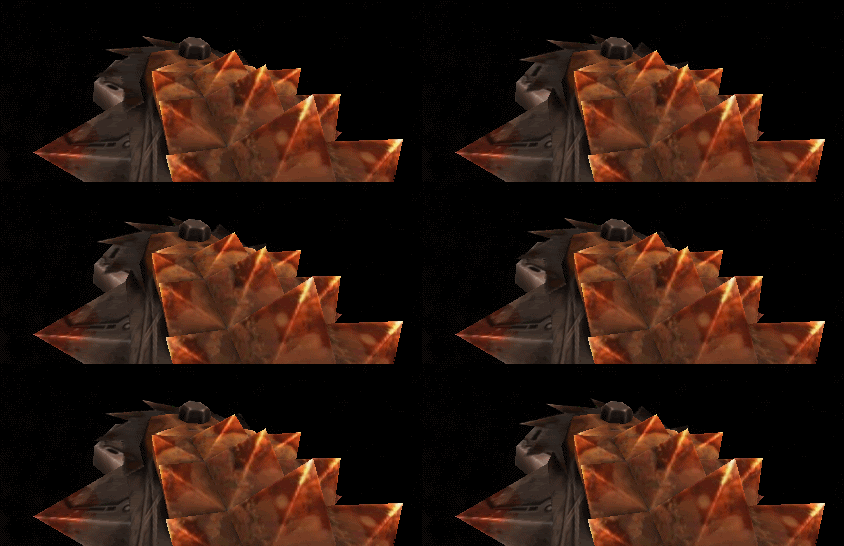
I made my chainsaw work with texture.But i want my saw blade to just continue rotating non stop the model itself.
http://img.photobucket.com/albums/v688/chrisredfield003/Thegauntlet.gif this is it with just texture spinning on a flat model of a sawblade.
http://img.photobucket.com/albums/v688/chrisredfield003/Thegauntlet.gif this is it with just texture spinning on a flat model of a sawblade.
Title: Moving weapon part.
Post by: cubus on November 10, 2008, 07:44:07 PM
Post by: cubus on November 10, 2008, 07:44:07 PM
I made my chainsaw work with texture.okay, copy that
But i want my saw blade to just continue rotating non stop the model itself.a little confusion on my side.... google-translater makes a strange sentence because of no meaningful results
this is it with just texture spinning on a flat model of a sawbladeokay..... clear
hm... in case of rotating disk - like in pic - you can add a bone (tag) in center of your disk (blade), link this bone to your weapon-origin. call it tag_blade
may you will not create a flat and smooth disk, make a thing with teeth. this disk, blade - whatever - must be a skin (in lightray), assign it to your tag_blade (bone).
now create in lightray a animation with some frames, for example "8", select your tag_blade, set frame "0" and press set in anim-toolbar. change to next frame = 1, use now
[menu->tools->transform->rotation],
rotate your tag for 45° in direction you like, press again set in toolbar, do this for all 8 frames. at the end, you meet your first postion. your rotation is perfect. the speed of spinning your tag_blade can be moddify by change the value smaller/bigger in FPS-field. value 8 means 1 round per second, 16 = 2 rounds/sec, 24 = 3 ronds/sec ........... i dont know, if fps > 100 will work in mohaa, i never try it before...... anyway, save/export this to moh-skd/skc-format, set absolutely "LOOP"-option on skc-export-tab.
anyway, spawning a model with running anim can breakdown your mohaa..... (my experience), you have to create a model without anim..... just number of frames = 0, tahts your idle_model.
for useing spinning blade-animation, the job i described for tik-file is necessary...
in case for a disk this will work..... maybe..... similarly with tank turrets that rotate too - just not as fast. To a great value at FPS (>48....) makes me thoughtfully, I fear that MoHAA then strike.
but if you like a blade in shape of a chain..... flat with round caps..... hmmm...... transforming vertic-position by use scale-option each frame in lightray during a running anim is possible, but it failed in mohaa (again my experience). also it failes in lightray, if you try to change a single vertic in his position, you allways move all together, if they belongs to the same skin.
so you have to assign each blade-vertic to a different bone..... each bone has to set new in position each frame.... i guess.....!
checkout pic..... 72 vertics = blue dots, 32 inside - 32 outside. to make the anim well and smooth, i guess you have to add also 72 bones, assign each vertic to his associated bone and move them (bones) for each frame......

last famous word........... haha, maybe to much words and phrases....
Title: Moving weapon part.
Post by: chrisredfield on November 11, 2008, 02:30:20 PM
Post by: chrisredfield on November 11, 2008, 02:30:20 PM
I actually understand.Ill try to do it the way u mentioned.
Did u get that fakk2 gun to workout?
on a diffrent note Can models be animated for just in maps? like for instance can i make a model of a saw table and make that model saw rotate ingame with in the tik and with a bone created no animation needed in lt3d?
Ive never really made anything move with script on aloop but the experience will help with alot of ideas.
Did u get that fakk2 gun to workout?
on a diffrent note Can models be animated for just in maps? like for instance can i make a model of a saw table and make that model saw rotate ingame with in the tik and with a bone created no animation needed in lt3d?
Ive never really made anything move with script on aloop but the experience will help with alot of ideas.
Title: Moving weapon part.
Post by: cubus on November 11, 2008, 08:58:33 PM
Post by: cubus on November 11, 2008, 08:58:33 PM
hehe, chainsword ingame? lol nice idea, but not executed.... i take it only for example, but maybe it might be possible..... :p
anyway, a sawtable without prepared spinning-animtion in lightray? hm.... let me see.
you can create two different models.
first your table..... looks easy so far...
- place a tag at position of possible blade center = option, for better handling if you like to move your table, tag will move also
- 2nd model is a blade with wonderfull deadly teeth... haha
then work in radiant. place your sawtable..... place your blade model.....
both need a targetname
then do in script something like attach-call
$your_blade attach $your_table "tag" 1 "0 0 0"
$your_blade [pink]rotatex[/pink] 10
use rotatex or rotatey for your favorite direction
moddify spinningspeed 10 by accelerate >10 or decelerate speed <10...... lol maybe reverse
optional you can use tables origin as responding tag...... you have to fix value for high-position
$your_blade attach $your_table "tag" 1 "0 0 64"
moddify 64 for exact position
other methode is useing a script_origin instead of "tag".... bind your blade to script_origin and rotate the script_origin
both ways should work......... i guess!!!! :dozingoff
anyway, a sawtable without prepared spinning-animtion in lightray? hm.... let me see.
you can create two different models.
first your table..... looks easy so far...
- place a tag at position of possible blade center = option, for better handling if you like to move your table, tag will move also
- 2nd model is a blade with wonderfull deadly teeth... haha
then work in radiant. place your sawtable..... place your blade model.....
both need a targetname
then do in script something like attach-call
$your_blade attach $your_table "tag" 1 "0 0 0"
$your_blade [pink]rotatex[/pink] 10
use rotatex or rotatey for your favorite direction
moddify spinningspeed 10 by accelerate >10 or decelerate speed <10...... lol maybe reverse
optional you can use tables origin as responding tag...... you have to fix value for high-position
$your_blade attach $your_table "tag" 1 "0 0 64"
moddify 64 for exact position
other methode is useing a script_origin instead of "tag".... bind your blade to script_origin and rotate the script_origin
both ways should work......... i guess!!!! :dozingoff